cron
On a daily schedule
- Retests each important page
- Re-runs old scenarios and invents new ones
- Looks for unobvious regressions
- Gives feedback on the experience of a fresh user
- Runs for 2-6 hours for detailed coverage
Claude Code, Codex or Cursor can poke at a page while you watch. Explorbot tests on its own and keeps everything it finds.
| Testing with Claude / Cursor | Testing with   |
|---|---|
| Works locally | Runs locally, on CI, or in Cloud Workers |
| Needs your attention | Runs autonomously |
| Leaves no trace | Writes a complete e2e test |
| Relies on accessibility controls | Combines HTML, ARIA and screenshots |
| Starts from scratch every time | Remembers every page it visits |
| One session, one test | Creates hundreds of tests over hours of work |
| Tests whatever you say | Tests as different personas: curious, psycho and more |
| Needs a test plan | Writes a test plan from the controls on the page |
| Unpredictable | Deterministic workflow: research, plan, test, summarize |
| Reports only to its own output | Reports every session to Testomat.io with charts, steps, logs, and artifacts |
Give Explorbot hours on a schedule for deep coverage, or minutes on a preview build to check what just shipped.
Exploratory tests can run on your CI pipeline just as unit and e2e tests do. Everything stays local, no external access from cloud services.
Verify a single function or component in isolation.
Drive the whole app through fixed user journeys.
A curious AI agent that investigates with intent.
Explorbot makes the third layer as routine as the first two.
Point Explorbot at a running web app and whatch it explores the app same way as your users do
The Playwright library with its browsers. The same engine your end-to-end suite already runs on.
Access to fast AI models from any provider. We recommend OpenRouter for the best speed and choice.
Nothing else. No GPUs, no virtualization and no special runners. If your CI runs Playwright, it runs Explorbot.
in tokens (no extra charge)
Recommended AI models that run at 100+ tokens per second:
Works with any AI API platform
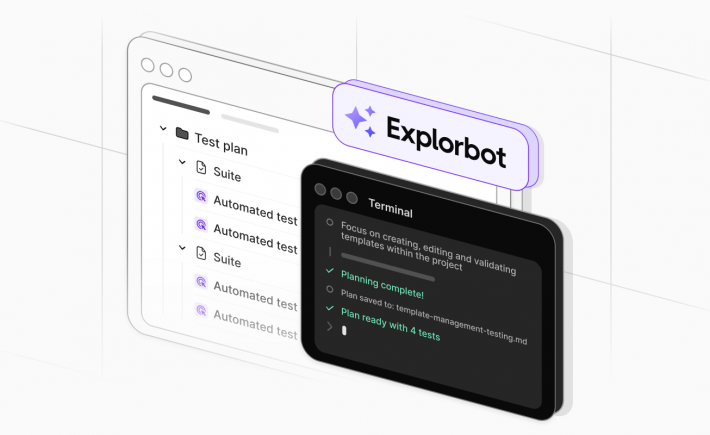
A real session: the agent plans, drives the browser and writes tests on the fly — no human in the loop.
Your Playwright and CodeceptJS suites re-run the same fixed steps every build. Explorbot re-explores the very same pages new ways — clicking new UI elements and paths your scripts never touch.
Regression suite
Same steps · every build
Explorbot
New ways & new UI · every run
Scripted tests repeat the exact same steps every build. Explorbot behaves like a curious user do finding new paths.
Explor can test brand-new features while in development preview. If feature is merged tests stays.
Point Explorbot at the app you already run. Here is how to set it up — and the kind of glitches it surfaces that scripted suites walk right past.

Add credentials, then point it at its main tables, forms and settings.
Catches glitches like

Add credentials, then point it at the deals pipeline and record pages.
Catches glitches like

Add credentials, then point it at the orders and inventory modules.
Catches glitches like
Explorbot never reads your source. It scans the live page, finds every interactive element and indexes it as a locator.


Explorbot expands dropdowns and collapsable elements to discover what is hidden.
Give Explorbot a goal and a URL — a team of specialised agents takes it from there, with no scripts and no human in the loop.
Maps the UI into sections and indexes every element — no docs or source needed.
Drafts test scenarios across normal, curious and edge styles — state changes first.
Drives the browser step by step; the Pilot breaks dead loops and adapts as the app changes.
Verifies each outcome before passing, clusters findings by root cause and captures evidence.
Saves passing flows as Playwright tests with reports and screencasts — and learns for next run.
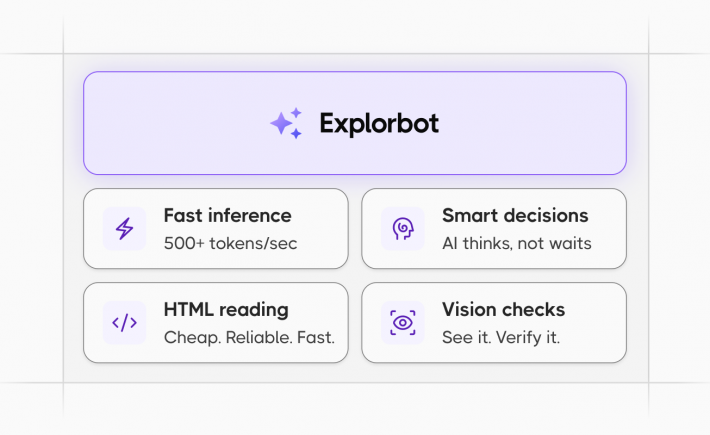
Cheap, fast workers do the clicking and reading; smart managers make the calls — so a full session costs cents, not dollars.
Maps each page into sections, locators and an element index.
Drafts scenarios and cycles testing styles: happy path vs. negative cases.
Drives the browser one real step at a time to run each scenario.
Supervises the Tester and breaks it out of dead loops.
Orchestrates the session and takes your commands in real time.
Executes browser actions with resilient locator fallbacks.
Writes the run report, clustering defects by root cause.
Saves successful tests as markdown or Playwright or CodeceptJS code.
Seeds data via REST API using OpenAPI spec or learns from intercepted XHR requests.
Specialized model by TypeSafe AI
Most models write an answer. Jev makes a decision.
Bounded output. Picks from the answers Explorbot offers. It cannot invent a selector or a paragraph.
Visible uncertainty. Every answer carries a probability, so doubt triggers a fallback instead of a guess.
Fast calls. About 0.3 s for a supervisor decision, where a full agent model takes 2.5 s or more.
“Which of these buttons we need to click?”
A locator hits several elements. Jev picks the right one, so the Tester clicks it without another round trip.
“Is the run still moving toward its goal?”
Jev confirms the Tester is on track, so Pilot skips a full review with the large model.
“Is assertion already vierified?”
Jev matches a new claim to one already proven on the page, so no duplicate assertions are written or run.
“Does the page show what we expect?”
For claims no assertion can express, Jev gives a judgement, kept apart from assertions that ran.
Every run is summarized into a report your whole team can read: a clear pass and fail breakdown, the pages and features it covered, and a written analysis of what works and what broke.


Shown here in Testomat.io. Self-hosted runs also produce standalone HTML and Markdown reports you can open or commit anywhere.
Also produces
Playwright or CodeceptJS specs for every flow.
Step-by-step screencasts of every run as evidence.
Knowledge it reuses to test smarter next run.
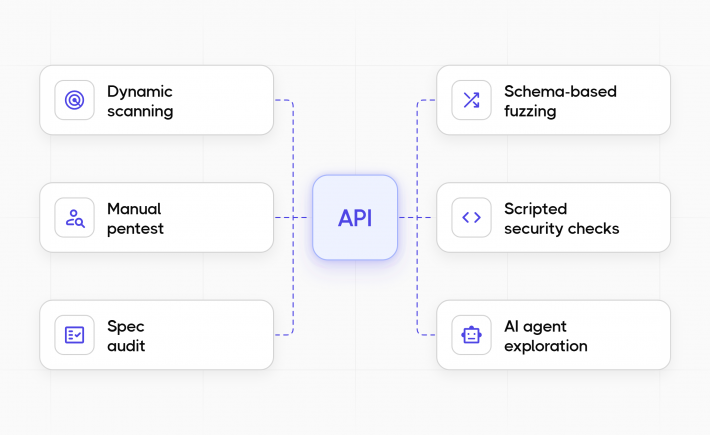
ApiBot and DocBot bring the same autonomy to your APIs and your documentation.

ApiBot autonomously tests your API endpoints — hunting for security breaches, edge cases, and the request combinations a scripted suite would never try.


DocBot walks through your app and builds documentation straight from the live UI, so it is never outdated. It is not a spec — it captures how things actually look and behave right now, even when no spec exists or the UI has grown past it. It documents the real, current state of your app.
Set up Explorbot manually or make an agent do the job for you.
Add Explorbot to your project, then scaffold a config and a
.env
file with a single command.
npm i explorbot npx explorbot init
Add the skills to your agent, then run
explorbot-setup.
It installs Explorbot, writes the config, and proves it can reach
your app before handing back to you.
npx skills add testomatio/skills claude /explorbot-setup Pick a site, start a bot and watch it test your app, all without leaving the editor.


Config, site and setup checks sit in the sidebar, with Edit one click away.
Run Explorbot, Apibot or Docbot on the selected site without typing a command.
See the plan, each test and its steps, logs and artifacts. Interrupt or stop at any time.
Download the extension from the latest release.
In Extensions, open the … menu and choose Install from VSIX.
Open the Explorbot icon in the activity bar, pick your site and start a bot.
Install it, read the full documentation, and run it on your own app — it's all on GitHub.
Your data, the models, and how Explorbot fits next to the tools you already use.
Yes. Explorbot runs locally and keeps everything in files on your own machine. It never ships your data to third-party services, with a single exception: the AI provider you configure. If you trust that provider, you can trust Explorbot. Optionally, it can send traces to Langfuse for logs and traceability, but you can run Langfuse inside your own infrastructure. Explorbot is built to run within your own setup, including CI, where it reaches internal services with no external connections beyond the AI endpoint.
We recommend pointing Explorbot at a local, dev or staging environment rather than production. It can create, change or delete records through the UI, so it belongs in an isolated workspace seeded with disposable data, signed in as a user with limited permissions and no real secrets in reach. You can still run it on production for regression testing, as long as that account is scoped to a single project or workspace and cannot touch anything critical.
Explorbot drives fast, cheap models over pay-per-token APIs such as OpenRouter or the OpenAI Platform. You cannot run it on a coding-assistant subscription like Codex, Claude, Gemini, or Copilot. Those plans only expose models that are slow and costly, which are not suited to the way Explorbot reads large amounts of HTML on every step. Pay-per-token open models keep a full run at roughly a dollar an hour.
Yes, through the OpenAI Platform. Add an API key from platform.openai.com and point Explorbot at gpt-luna-6 for reading pages, agentic decisions and vision. This is API access billed per token. Pricing should be as low as 1.5$ per hour of extensive work.
Yes, through Google AI Studio. Add an API key from aistudio.google.com and point Explorbot at gemini-3.1-flash-lite for reading pages and vision, and gemini-3.5-flash for agentic decisions. Flash-lite is the cheapest tier for the token-heavy reading, the full flash is stronger where the decisions are made. This is API access billed per token.
Cursor, Codex, and Claude Code are coding agents. They help a developer write tests interactively. Explorbot is built to run on its own for hours at a time, on CI, with no human in the loop. It is designed for continuous testing, not pair programming with a developer.
Yes. If you host your own models with vLLM, Ollama, AWS Bedrock, Azure, you can point Explorbot at any inference endpoint through the Vercel AI SDK. Speed and pricing then depend entirely on your infrastructure. For most teams, outsourcing to OpenRouter is simpler and more cost-effective than maintaining dedicated GPU capacity.
Explorbot fits CRUD-heavy web apps best: SaaS platforms, ecommerce, ERP, admin panels and internal tools. It is not a good match for landing pages, blogs or static sites. It works best when every screen has its own URL and uses titles and headings consistently, so it can tell one state from another. Point it at an isolated workspace or staging environment seeded with non-critical sample data, using an account with limited permissions and no real secrets.
Read the full prerequisitesExplorbot is source-available under the Elastic License 2.0 (ELv2), the same license used by Elastic and Grafana. It is free for commercial use: you can test any application, including commercial products, modify the code, self-host it and build it into your workflow at no cost. The one restriction is that you may not resell Explorbot itself as a hosted or managed service.